Showing posts with label blog love. Show all posts

hello, goodbye!


It's been nearly seven years since I first posted here at {long distance loving}. So much has changed in the blogging world in those years. So much has also changed in my world. I was freshly married with two cats when I penned my first post, which seems like a lifetime ago as my two little ones sleep upstairs. With that in mind, it's with great excitement I share my new home on the internet: ali-v.com.

You'll find some of your favorite posts from {long distance loving}, along with new content that is aligned with the lady I've become. If you have favorite posts from over the years, please tell me in the comments below (or via email). I am only moving the best content! I'm planning to keep this blog alive for posterity's sake, but any new content will appear there. I also welcome any topics you'd like me to explore in the coming months, as I finally surface after these foggy first years of motherhood.

You can sign up for my email newsletter to start receiving posts from my new blog from the get-go, along with Bloglovin which I will transfer when everything is all set. Thank you for making this blog such a safe place to share my hopes, fears, wishes, and joys. I hope you'll all join me as I make this transition -- and step forward. I owe you my sincere gratitude for ALL that you've given me... and I can't wait to give you more when my new site launches next month :)

All my love -- and see you on ali-v.com soon! Alison

P.S. I worked with Ready to Blog Designs on my new site -- she created my amazing logo and site! -- and I cannot wait to show you how it all came together. I truly hope you love it as much as I do.

Image HTML map generator

how to build better pinterest boards (and why you should).

how to build better pinterest boards (and why you should!)

I remember my first introduction to Pinterest in early 2011. A new blogging friend told me about it over lunch and she offered to invite me. I joined and immediately fell in love. The concept was novel: one place to keep all your inspiration online. In the ensuing years, Pinterest has grown to be so much more than just a place to pine over pretty homes or get hungry from scrolling through recipes. It is a serious traffic generator for blogs, brands, and businesses. If you're a blogger, you know how important it is to have a strong presence on Pinterest, both with the content you create and the content you're sharing.

While I don't have a million followers, I have invested a great deal of time and energy in curating my Pinterest boards over the years. However, it wasn't until recently that I decided to put thought behind my board descriptions. Why? I always thought my board names did enough. However, I realized that the method behind my madness may not always be as apparent for others as it is for me. 

I did some research to support this effort. Board descriptions can be captured by search engines, which means you could be attracting a wider audience with a few simple keywords. With the more advanced search features now available on Pinterest, they tell us that solid board descriptions will also help when someone searches within the site. If you're into SEO (aka search engine optimization), your SEO efforts shouldn't end on your blog -- they should extend to your pins and board descriptions as well.

Should you want to make your profile more search engine friendly, click on the gear in the upper right hand corner of your Pinterest profile. You'll see the option to Edit Settings. Click through there and you should see the Search Privacy option. You will want to make sure your settings are open to search engines. If you want your profile to be open, it should look like the image below.
I invested a good hour in crafting descriptions for my 44 (current) boards on Pinterest. I focused on giving a light-hearted but informative description for someone who may be newly discovering my account. I kept with the style of writing I use throughout all of my pins. My hope is that these descriptions will illustrate the thought and effort I put into my boards.

Last but certainly not least, I made it my mission to make sure all of my pins are properly sourced. I wanted to ensure that my followers know they can pin from my boards with confidence. I included the simple line: (all images linked to original source) It may not seem like much, but I can hopefully continue to spread the message that proper sourcing is absolutely essential within a social media machine like Pinterest.

While Pinterest analytics tell us a great deal, they may not tell us what searches bring us to our profiles. Even still, I think it is worth the effort to invest the time in your Pinterest profile. In doing so, you will build better boards -- and will hopefully attract more followers as a result. I know I appreciate other pinners who are intentional about their boards, so I imagine others do too. Thanks for indulging me in this geeky post -- and I hope it inspires you to spend a random hour (while watching mindless TV, perhaps?) updating your boards to make them the best on the block! I'd be happy to answer any questions in the comments section :) xoxo {av}

If you want more posts on Pinterest by yours truly, here are a few favorites:


a blogger baby shower.


At the end of October, two of my dearest friends -- Kate {of DomestiKatedLife} and Lindsay {of Lindsay Jean Design + Duchess} -- threw baby {v} and me the shower to end all showers. From the moment I walked in the door, I was overwhelmed with their thoughtfulness and creativity. I knew these two would throw an amazing shower, but I had no clue just how incredible it would be. They truly outdid themselves on this one. 

You can see a few of my favorite details from the shower below, but you can see even more from the hostesses themselves. Take a peek at this post from Lindsay and this post from Kate for more photos and the sources of the goodies they used!

my favorite funfetti cupcakes with EDIBLE gold star sprinkles! 

a cheese plate found in every pregnant woman's dreams: completely pasteurized + delightful! 

mint chocolate anything is my weakness // a donut tasting bar?! I can't make this stuff up...

pretty drinks for the pregnant + non-pregnant crowd on the most colorful bar cart around.


When I started this blog four years ago, I never envisioned that two friends I made from blogging would throw me a baby shower of such beautiful proportions. Fast forward to today: I truly see the internet as the vessel to meet the people who were supposed to be in my life from the get-go. Many of the ladies who attended {and sent gifts from near and far} also happen to be sweet friends made courtesy of the world wide web. To everyone who came or sent their love, you sure know how to make a girl -- and baby {v} -- feel loved! You all nailed it with your gorgeous gifts. Baby {v} will be one well-outfitted and cuddly little one ;) I may sound like a broken record, but I mean it: thank you from the bottom of my heart, Kate and Lindsay! xoxo {av}

best google fonts for blogs.

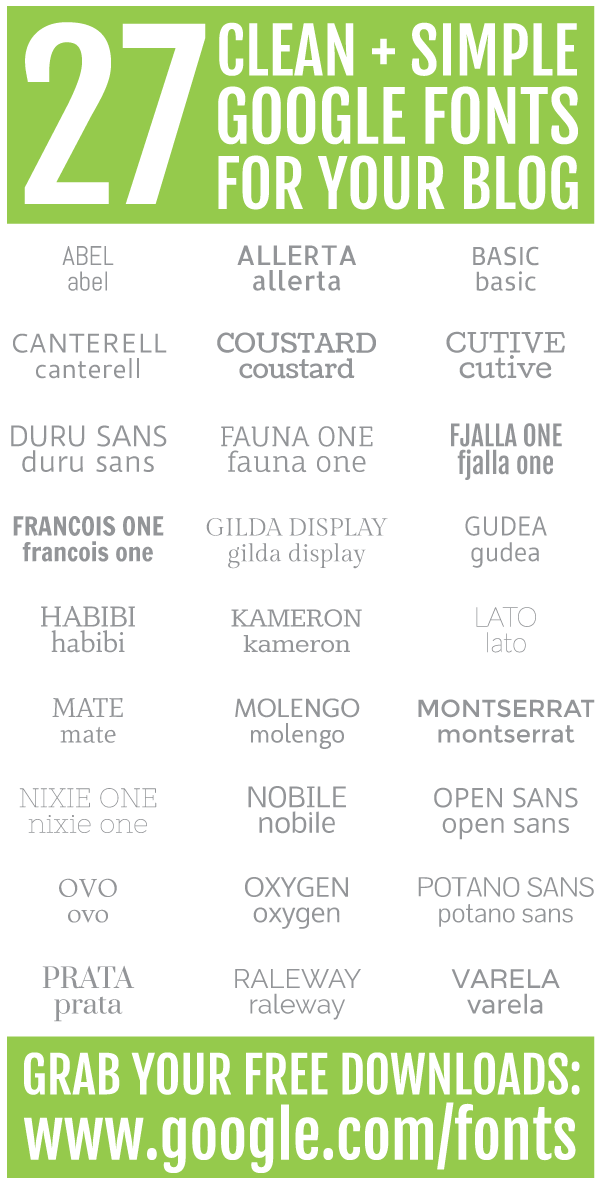
27 clean + simple google fonts for your blog (for free!)
Two weeks ago, I encountered some slow load time in my web browser and was tired of waiting for it to load. I decided to restart my MacBook Pro in the hopes it might bring it back up to speed. Little did I know, shutting down my laptop signaled the death of a certain sector of my hard drive {or so they told me at the Apple Store}. Thankfully, I had purchased AppleCare with my computer and I was still under warranty, so I managed to squeak by unscathed financially. However, my font book did not. 

Low and behold, I was able to recover all of my files {music, photos, design projects, etc.} in safe mode while making myself at home at the Apple Genius Bar. In the hurry to make sure I transferred over the important stuff, I didn't transfer the extensive collection of fonts. It didn't hit me until I opened up a project from my hard drive to discover that all of the fonts I downloaded over the past three years were gone.

At first, I was heartbroken. I am a self-professed font geek, so I didn't take this loss lightly. After a few hours, I had a lightbulb moment: it was time to start new. A font I loved when I first started my blog in 2010 {i.e. Caviar Dreams} was no longer on my top ten list. It was time to start with a blank slate and build a repertoire of new favorites. I started my search using Google Fonts.

I scrolled through all 600+ Google Fonts to download a few which caught my eye. The 27 fonts you see above passed my test, though I haven't had a chance to try them all out extensively. I think it is important to visualize the font in both upper and lower cases, so I gave examples of both. Sometimes, I use a font purely in all caps because I like it better. I'm funny like that ;) Feel free to download a few and see if they suit your fancy!

Do you have any favorite fonts? Have you noticed that your taste in fonts changes too? Thank you for indulging me in a geeky post. The long and short is to always buy AppleCare--and be willing to roll with the punches of a cleared hard drive. In the end, it was refreshing to rebuild my font book, even if it was initially jarring. xoxo {av}

P.S. To download a font file using Google Fonts, simply click "add to collection". A box will appear at the bottom of your screen, on which you'll then press "use". You'll be taken to a new screen and should see a downward-pointing arrow on the right side of the screen {just above something which looks like a speedometer}. Click to download the font as a .zip file. Once downloaded, click on the font in your downloads folder {or wherever you saved it}. Simply follow the prompts to add it to your font book--and always adhere to the font licensing! {NOTE: this is how it works for a Mac; here is a tutorial for a PC.}

how to choose your facebook cover photo.

how to choose the right facebook cover photo for your blog or business.

Happy Monday! Since I'm a serious nerd, I conducted a little experiment over the weekend on Facebook and learned a thing or two about cover photos in the process. To save you the time {and advertising dollars!}, I wanted to share my takeaways from my two-day ad campaign. I was super curious to see what photos engaged the most people and drew enough intrigue for someone to click over to my blog's Facebook page.

I chose four rather different images: a sailboat, macarons, hydrangeas, and a scene from Cape Cod. Each of these four things are close to my heart, thus I would hope to find readers who enjoyed the same things. {Note: I'm not a sailor, but I do love boats.} It may just be super dreamy, but the photo from the sailboat outperformed all three of the other images by nearly 400%. After that overwhelming vote of confidence, I changed the cover photo of my Facebook page to the sailboat scene this morning.

Facebook cover photos have always intrigued me, mostly because it is just another thing to "get right" in the game of attracting new readers or fans. The image you feature needs to grab their attention without going over the top. Here are four things I considered as I chose the images for the ad run, which ultimately translated into my new cover photo:

1) If at all possible, use your own photo or graphic. By using someone else's photo, you're not showing off your work. Sure, someone else's image may be pretty, but giving proper credit on Facebook isn't the easiest thing to do. It also allows for someone to snipe the image and use it for their page, thus causing the same problem that happens frequently on Pinterest: lost, stolen or missing image attribution. Avoid all of that--and use one of your favorite Instagrams or snaps from a recent vacation.
2) This may seem obvious, but choose something that appeals to the type of people you'd like to reach. I would love to attract readers who have a thing for New England, hence several photos in this experiment having a northeastern pull. Ask yourself if this particular photo would make you want to click over or stay for awhile to scroll through your page.
3) Don't overdo it. A busy image with lots of text may seem appealing, but the attention span of most people is under ten seconds. You only have so long to "hook" someone. In a very literal sense, think of your cover photo as your magazine cover: would you want to pick up a magazine with a super cluttered cover? No...
4) Adhere to Facebook's sizing suggestions. I created my images in the 851 pixels wide x 315 pixels tall format. You should too! Whenever Facebook gives clear suggestions on sizing, I follow them! No one likes distorted images or text. 

What other suggestions would you have for bloggers and businesses as they create their own cover photos? What appeals to you? What turns you away? I think the best way to help one another is by sharing our own observations. Even if you're not a blogger, I still think these suggestions can apply to your own cover page. Last but not least: if you're here as a result of my "experiment" this weekend, I'm glad to have you! Thank you for the insight into making my little corner of the internet better. I hope this helps beautify and boost your own Facebook page in the process! xoxo {av}

last minute valentine's day ideas.

easy last-minute valentine ideas!
Whether you're celebrating Valentine's Day or not this year, you have to admit its cheery colors are essential for surviving this dreary winter! These seven ideas will solve your last-minute woes: whip up any of the bunch and your valentine will be singing your praises to the moon and back...

1) Crunchy Creamy Sweet: This Valentine's Day Bark is the perfect treat: colorful, yummy, and easy to share. If you make a large batch, you can still save some for yourself!
2) Real Simple: Use an old matchbook to create this clever little card. Make it extra special by using a matchbook from your favorite restaurant!
3) Martha Stewart Weddings: As a map lover, this simple DIY stood out from the pack. Print a map to place on the existing mat in a frame and share one of your favorite places with your valentine and/or best friend. {If time permits, you could even buy a vintage map on eBay or elsewhere on the interwebs!}
4) Style Me Pretty: Though the Style Me Pretty team is spot-on with their suggestion to make these for your bridesmaids, these glitter tote bags serve so many other needs. Whip together one of these glittery concoctions for a quick gift or use it to transport your goodies--and conveniently leave it behind as a gift. Sneaky sneaky...
5) The Novice Chef: The first moment I saw these marbled red velvet cheesecake brownies, I knew it was love. The rich red color is perfect for Valentine's Day--or any day really ;)
6) Young House Love: Displaying keys can be a poignant, everyday reminder of how much your love has endured. As a long distance survivor, I think this little DIY is extra meaningful.
7) Paper & Stitch: Long after Valentine's Day is over, you can still create your own mylar goodie bags. Until then, whip up these shiny bags to serve your tasty treats in style!

Still stumped on what to make for your sweetheart {or your best friend!} this Valentine's Day? There are plenty of other ideas my future diy + sweet tooth boards on Pinterest. If you want to send your love on paper, you better get a move on. Though my preference is always snail mail, I think Paperless Post is the best for virtual valentines! What other treats do you have up your sleeve for Valentine's Day this year? xoxo {av}

my pledge for 2014.

teacups on portobello road.
 {Notting Hill}

A very happy 2014 to you! This is my first post in nearly two weeks, marking my longest blogging hiatus since I started blogging in November 2010. It came at the perfect time. The last few months of 2013 proved to be rather crazy, both personally and professionally, so the time away was just what the doctor ordered.

the ritz london.
 {The Ritz London}

I wish I could give you a grand plan for what I'll be doing differently in 2014, but I was a little busy during that time away. Our European vacation {best documented on Instagram} will give plenty of inspiration for posts in the coming weeks and months. {After taking nearly 1000 photos, the iPhone photos in today's post will have to do until I sort through all of them.}

Here's what I can promise you in 2014: I pledge to bring you my best. I pledge to blog when I have content of value to share, rather than simply pushing content for content's sake. I pledge my honesty and sincerity in the posts I publish. Most of all, I pledge to be me. I won't apologize for the less than glamorous daily life I lead. In my opinion, this blogging world has become a bit idyllic and {dare I say} fake. While this can be a pretty world to live in, I didn't start blogging to live in a dream world. I started blogging make the world I do live in better--in my own little way. I only hope you'll stick along for the ride... xoxo {av}

make 2014 amazing.


Since most people have tuned into their lives and away from the blog world {for good reason!}, we will likely be in Europe by the time you see this post. {YAY!!!} We are flying out on Christmas night for ten magical days, just the two of us. Click here for our itinerary! I'm also doing something a bit unconventional for me while we're gone: I'm leaving my laptop at home. I will be checking out of the blog world until the first full week of January, but I didn't want to leave you hanging completely...

Here's a little look back to the posts which got the most buzz {or were among my favorites} in 2013:
-why you should always eat the cupcake, also known as the post where I made peace with weighing ten pounds more today than I did on our wedding day in 2010
-an amusing look at my curl evolution--and my three-minute recipe for perfect curls
-building a gallery wall which represents your life {not the one you see over and over again on Pinterest}
-a bright look at Pantone's color report for spring 2014
-is it sad that I'm still dreaming of these boots or that I'm still trying to master booties?
-my New England portrait, as captured by the fabulous Kate Headley
-five tips for bloggers on how to win big on Pinterest, otherwise known as the post where I shared my Pinterest secrets {and while I'm at it, this post on how to add a Pin It button was also a fan favorite}
-somehow, my favorite quotes all used photos from our nautical adventures {see here, here, and here}
-how to make macarons at home {it can be done!}
-a few tips on planning an amazing girls' getaway or a killer bachelorette weekend

Before I go, I must send my heartfelt thanks for making 2013 infinitely better. I know there are plenty of blogs out there to fill your reader, but the fact that you take the time to follow along with {long distance loving} means the world to me. I put my heart and soul in this little blog and I hope it shows. I don't know about you, but I'm excited to see what 2014 has in store. I can't wait to make 2014 amazing, with you by my side. I wouldn't have it any other way. Have an amazing Christmas and a wonderful start to the new year! xoxo {av}

P.S. You can stay in touch via Instagram, Facebook and Twitter while we're away on our European adventure. I'll be back to normal posting the first full week of January!

five tips for bloggers to win big on pinterest.

Five tips for bloggers to win big on Pinterest!

One small disclaimer: these are my findings. There is no scientific study behind them, simply what has worked for me. Some of this may not be new to you, but it never hurts to hear it again. Pinterest is a phenomenal traffic driver and learning to unleash its repinning fury is half the battle. Without further ado, these are my five best tips for bloggers to win big on Pinterest...

1) While landscape photos (aka those that are short and wide) look nice in your browser, they are not ideal for pinning. Ensure your photos are tall rather than wide and you'll feel much more love on Pinterest. Taller images take up more visual real estate on Pinterest--and you want ever ounce of real estate you can get. Experiment a few times with this and you'll see what I mean. (My Pinterest feed is one giant example of portrait photos--with very few exceptions.)

2) It goes without saying that visually appealing images or content will attract pinners. (Think about what you like to pin!) Creating visually appealing images or content is much easier said than done. Cropping photos goes a very long way. Example #1: I loved this pretty scarf, but the photo was  taken landscape. I knew it wouldn't pin well as well in that format, so I cropped it a bit. (NOTE: Even though I uploaded the cropped photo to Pinterest, it is absolutely essential to add the correct source.) The result was a pin which did quite well (and illustrated the portrait vs. landscape idea perfectly). Example #2This sporty outfit didn't pin well because the photo was a bit far away. Ensuring your audience can see your content (whether it is an easy-to-read font or a close subject) will help you immensely.

3) Timing matters. I pinned this yummy lobster crostini recipe around 2pm one day--and it got zero repins for the first hour it was up. I decided to take it down and pin it again later in the day. It now has over 170 repins, simply because I saved it for a more optimal "viewing window". If I pin after 9 or 10pm, I can almost guarantee these pins will get more love. The day of the week you pin also matters. Imagine the days you procrastinate most (and are close to a computer). In my experience, Wednesday, Thursday and Sunday are my best days for repins.

4) Be pinnable. You really, really need to have a Pin It button installed on your blog. I shared some tips on this very topic a few months back (see here). Plain and simple: if people cannot easily find a way to pin from your blog, they won't

5) You need to know what's winning--or pinning, as the case may be. Pay attention to what people are pinning from your blog, so you can tailor your future content. Once your blog is verified, you can track your analytics to maximize your Pinterest potential. I do not advocate spying, but you can do an easy case study to check out how your favorite blogs are being pinned. Simply visit their source page (http://www.pinterest.com/source/INSERTURLHERE) and get some insight into what is striking a chord with their audience. While you should not copy their content, you should use your findings to build your Pinterest awareness.

Truth be told, I still have a lot to learn. I am also a firm believer that the best teachers we have are one another. I would absolutely love for you to share your own findings in the comments section below. The blogosphere (and our Pinterest feeds) will be better because of it! (If you feel so inclined, pin this graphic so you can come back and take a peek at the full conversation in the weeks and months to come.) I can't wait to hear what else you have to add! xoxo {av}

moon & lola monogram giveaway.


On a very rainy and cold night three years ago, this blog was born. Little did I know that my spontaneous foray into blogging would turn into this amazing adventure. I can't wait to see what my fourth year of blogging brings...

The best part of this milestone? One of my favorites, Moon & Lola, kindly offered to help me celebrate this third anniversary with an amazing giveaway! {If you don't know Moon & Lola, you definitely should: they are the talented folks behind the original acrylic monogram necklace.} You can win one of your very own acrylic monograms below--there are plenty of ways to win!

a Rafflecopter giveaway
Many thanks to each of you for making this blogging journey worthwhile! A big thank you to Moon & Lola for helping to make this little anniversary special :) You can get all the specifics for this giveaway in the Rafflecopter widget, but you have until next Monday, November 25th at 11:59pm EST to enter. I will announce the winner on Tuesday, November 26th. Best of luck--and thank you form the bottom of my heart! xoxo {av}

psst: If you enter on instagram, simply take a screenshot of my instagram and share it like you would if you took a photo with your phone outside of instagram. Don't forget to include the hashtag #moonandlolamonogram and tag @amv529 and @moonandlola. If you tag three friends in your picture, you can also earn another entry :)

blogger chain mail.

{photo by Kate Headley}

Last week, Elizabeth and Heidi tagged me in what I am affectionately calling blogger chain mail. I sat back and realized I haven't done a post like this in years. I know you've all been waiting with bated breath for one, right? {Just kidding of course!}

FAVORITE FLOWER? Without a doubt, lilacs. Hydrangeas are in a close second. {See evidence from my wedding bouquet here.}

MOST / LEAST ORGANIZED SPACE IN YOUR HOME? My closet is definitely the most organized, except when we've traveled two weekends in a row. My pantry, on the other hand, is always in disarray. Weird?

WHAT BOOK HAVE YOU READ RECENTLY THAT REALLY MOVED YOU? I'm going to make a big admission here: I've struggled to continue Lean In. Most of the books I find myself reading these days are pretty mindless--mostly because I haven't had the bandwidth for something deeper. Even if she didn't "move" me, Gillian Flynn keeps me on the edge of my seat.

WHAT DISH ARE YOU MOST LOOKING FORWARD TO AT THANKSGIVING DINNER? The clichĂ© of all Thanksgiving dinner clichĂ©s: my mother's turkey. She actually stuffs the bird and the flavor is out of this world. 

HOW DO YOU TAKE YOUR COFFEE? I don't. If I need caffeine, I reach for an ice-cold Diet Dr. Pepper--preferably of the fountain variety. 

WHAT DO YOU MISS MOST ABOUT HIGH SCHOOL? To be frank, I don't miss much. I was a crazy lady in high school. I miss small town life but not the small town rumor mill. My days were filled to the brim with cross country, music theatre, AP classes, youth group, and life. I do miss the simplicity of life: one without college debt, one without a full-time job, one without adult decisions. While I didn't feel carefree during those four years, the cares I had then pale in comparison to the cares I have today.

MOST MEMORABLE CONCERT? July 27, 2004. John Mayer. Bonner Springs, Kansas. SECOND ROW. We even locked eyes during my favorite song, Split Screen Sadness. I had repeat second row seats for the tour he cancelled in 2012. I'm still not over missing it.

HOW DO YOU UNWIND BEFORE BED? While I'm terrible at unwinding, {cv} is great at it. He is the only person in the world who gets me to slow down. At the end of a long day, we end up on HGTV watching a House Hunters episode with our cuddly cats. We are clearly the epitome of cool. 

DOTS OR STRIPES? Stripes. Since I moved to New England, the volume of stripes in my wardrobe has more than tripled. Oops?

Any other burning questions for yours truly? Since this has been floating around a bit, I'm sure I'm tagging someone who has already been tagged but I'll give it a go. CaitlinJillian, Melissa, Natalie, and anyone else--these questions are all yours! xoxo {av}

you is.

Happy Monday! Emily suggested this quote from The Help and I knew I had to bring it to life. I loved the movie inspired by Kathryn Stockett's novel and my favorite scene featured these nine caring words:


I realized this quote could be related to blogging, as almost everything can ;) It may not be the exact interpretation that Kathryn intended, but I'm running with it...

KIND: Be supportive not combative to your fellow bloggers. If you see something which may be wrong in their post, don't call them out in a comment. Everyone makes mistakes. If you feel inclined to share the error, send a friendly email and let them know you have their best interests at heart.

SMART: Do some research to see what content resonates best with your readers. Engagement isn't limited to comments or pageviews. Pay attention to what is being pinned from your blog and you can create content which will keep your readers coming back for more. {If you don't know how to find this, all you need to do is visit: pinterest.com/source/YOURURLWITHOUTWWWHERE} 

IMPORTANT: Even though it is easy to do, try not to get bogged down in the numbers. Everyone in the blog world brings something unique. A crazy amount of pageviews doesn't always translate to blogging success. You are important and your words are helping someone, whether they tell you or not.

What else might you tell a new blogger to make them feel at home in the blogosphere?
Want to see your favorite quote come to life? Submit yours + I might use it in a future post!
xoxo {av}

how to add a pin it button.

A few months ago, I decided it was finally time to install a "pin it" button on my blog. I searched and searched for tutorials until I found one which wasn't crazy programmer jargon. I know a bit more about HTML from my days as a 16-year-old computer geek than the average person, but I promise this isn't a difficult tutorial. BloggerSentral made it as simple as possible--click here to see more! {Note: BloggerSentral gives instructions for Blogger and Wordpress--my post just centers around Blogger!}


A few words for the wise:
-Make sure you've BACKED up your blog before you make any changes. You can do that easily in the "Template" tab {the same place you'll be making the changes in your HTML}. It is in the upper right corner of your screen, below the Google + icon.

-When you're ready to add the <script>, click within the HTML window and then press control F {or command F} to find the </body> tag in the HTML. The placement of the <script> is most important!

-If you want to prevent something on your blog from being pinned after you install this button, you'll need to click over to the HTML tab in your blog post. Don't get scared by the HTML! Scroll down until you find the <img> tag which you want to "hide" from this widget. {For those new to HTML, you can just look for text which you know is around the picture to identify it. Simply add this text before the start of the <img> tag: <div class="nopin"> and then add this after the <img> tag is complete: </div>. It will look a little something like this: <div class="nopin"><img src="long random url"></div>

CLICK HERE FOR THE FULL CODE--these partial snippets won't do you any good! If for some reason you input the code from this source and it doesn't work, try copying and pasting from here, here or here. I'm not sure of the rhyme or reason behind it, but sometimes, one site works over another. I wish I was a big enough coder to tell you why!

If you wanted to add the pin it button I have on my blog, you're more than welcome :) All I'd ask is for you to give a quick shout-out to this post once it's installed! Simply click here to copy and paste the image URL into the quotes within HTML here: bs_pinButtonURL = "PLACE URL HERE".

Was this helpful? What other little tutorials would you want me to tackle?
This is pretty high on the geek scale, but I hope it's helpful. I know many of you have the button installed, but for those of you who don't, this tutorial was the easiest one I found. I can tell you that I've had many more pins off of my blog since I installed my pin it button. It works, people! I'm not the queen of coding, but I can certainly try to answer your questions! If you have any other questions, you can email me one off. xoxo {av}

P to the S: After completing this post, I noticed my pin it button wasn't working. {Fancy that!} I had to re-install it, which was a great test in preparation for this blog post. My learning?! Having the "pin it" button readily available is absolutely essential to getting traffic from Pinterest. The number of pins had dropped drastically since the pin it button disappeared! If all else fails, simply copy and paste this code before your </body> tag for a simple and reliable "pin it" button: <script type="text/javascript" data-pin-hover="true" src="//assets.pinterest.com/js/pinit.js"></script>

say it ain't so.

The July 1st deadline to transition from Google Reader to another service is ever-present in the blog world this week. I'm trying to lighten the sadness of Google Reader's exit with this pretty snap from last Friday ;)


I hope you'll decide to stick with {long distance loving} for the long haul! If you haven't chosen your next feed reader, I happened upon this extensive list of options via LifeHacker. Simply add this link: http://feeds.feedburner.com/longDistanceLoving to whatever option works best for you. If you don't read blogs with a "reader" of sorts, then keep on doing what you're doing!

As always, you can also keep up with {long distance loving} using a plethora of social media outlets--including but not limited to Instagram, Facebook, Twitter, Pinterest, and even Google+. You can also follow along via email by clicking here! Last but certainly not least, you can catch every post using Bloglovin' by clicking here.

What "reader" will be using after July 1st? I've created a number of different accounts using Feedly and Bloglovin'--I just haven't made my final decision. I do apologize I am not sharing a more creative post today, but it is a necessary one! See you on Friday for a beachy round of #FridaysFancies! xoxo {av}

alt nyc bound!

It's finally time for Alt Summit NYC! For nearly three months, I have been anxiously awaiting the arrival of Thursday, June 20th. It has been a dream of mine to attend the festivities at their flagship conference in Salt Lake City, but NYC will have to do for now. I am counting the minutes until they open the doors of the Martha Stewart headquarters on Thursday morning! {It feels a lot like Christmas!}

{image credit: Daniel Schwen}

My outfits are planned and my moo.com business cards are at the ready. I am itching to see the magic they have in store! The speakers are absolutely out of this world and my fellow attendees are serious rockstars. I am more than a little nervous about being up to "par" with the Alt crowd, but I know I have to push my limits and take the leap. I feel like Alt will be the push I need to really make things happen!

If you're not there, don't worry! You can keep tabs on all the magic via Instagram and Twitter
The hashtags #altsummit and #altnyc are sure to be treasure troves of Alt Summit goodness.

If you are there, keep your eyes peeled for me--I'd love to meet you :) I'm the short girl with the big laugh!
Here is my "virtual" business card to continue our real-life and online friendship:
INSTAGRAM: @amv529   ||   TWITTER: @luvfromafar   ||   PINTEREST: @luvfromafar
FACEBOOK   ||   BLOGLOVIN   ||   POLISH YOUR BLOG

I'll see you back here on Friday with to celebrate the first day of summer with #FridaysFancies! xoxo {av}

#seemyshowcase - april edition.

A very happy Monday to each of you! I've been excited for this Monday since I first shared the idea for the #seemyshowcase Instagram challenge in March. The #seemyshowcase monthly link-up will be your one-stop-shop to discover great new Instagrammers, whether they're bloggers or not. You can also showcase your favorite shots from other IGers by adding them below. See it as a way to give them a virtual pat on the back ;) The photo I chose for this month was taken on Cape Cod a couple of weeks ago. Spring still seems as far away as it did in this picture...


If you're like me, you have come to love Instagram for a peek into the daily lives of others {in a non-creepy way, of course}. As a lover of photography, Instagram is even more addicting. I love the photo-editing process {see this post} and now see Instagram as a place to share only my best. If you've never participated in a link-up, here's a little how-to guide to help make it easier for you.


If you have any questions, feel free to email me. Rememberyou do NOT have to be a blogger to participate. All you need to do is add the link to your favorite Instagram from the past four weeks--and you're done! Add only one from your account for each month's link-up. If you want to showcase others, you're welcome to add as many as you like :) Make sure to let them know using the #seemyshowcase hashtag in a comment on their photo! This link-up is all about sharing the love!
If you want to join in the link-up in future months, be sure to add yourself to the mailing list.

How do you chose what you do and don't on Instagram? Are you picky or do you just go for it? 
I can't wait to hear about your process! Have an amazing Monday! xoxo {av}

STAY IN TOUCH: BLOGLOVIN + INSTAGRAM + TWITTER + PINTEREST + FACEBOOK

the best way.

Though it may feel like Monday for some of you, it definitely feels like Tuesday in my neck of the woods. Yesterday was non-stop, but I wouldn't change it for the world. I count my blessings every day for the craziness, as weird as that sounds. Robert Frost always has a way of saying things which makes perfect sense. {He's the quintessential "quote guy" in my book.} The quote below is totally true--and helped me remember to keep my eyes on the prize and not get bogged down by the clutter this week...


In thinking about what gets me through, posts from fabulous bloggers definitely help. I love seeing "link love" posts on other blogs, so I wanted to start sharing some of my own. These are just a few of the links which caught my eye in the last few days. If I tried to capture them all, you'd all get tired of scrolling. I promise more posts featuring other favorites soon :)

Anna from {dear friend} spent some time in one of my favorite New England haunts:
Portsmouth, New Hampshire at Christmastime. Trust me, you'll want to visit too.

Ashley from a {little} dash of ash got me prematurely excited about spring with all of
the colorful Sperrys now available at J.Crew. I still can't decide which ones I want!

Carly from College Prep explained about how she is keeping her new year's resolutions alive.
I love how much she is aiming to make goals manageable and attainable. So spot-on.

Christin from with a c.h. posted an amazing recipe for sweet + salty curried almonds
I've been trying to find healthy snacks with a twist--and these totally fit the bill!

Grace from Stripes + Sequins shared news about an amazing initiative + fun contest to raise 
heart health awareness. I'm already crafting up my #showusyourheart instagram...

What links have been inspiring you lately? Share the love, friends! Inspiration helps us all :)
Stay cozy today... xoxo {av}

STAY IN TOUCH: INSTAGRAM + TWITTER + PINTEREST + FACEBOOK

get real.

Happy 2013! On New Year's Day, {cv} and I made the trek back to the Northeast after a few glorious days in the Midwest. We finally made it back in the early hours of the 2nd. If I had been on my game, I would have had a post ready to go for the morning but I soaked every minute out of the holidays instead. I was exhausted and I knew the quality of what I could blog would be less than my standards. I tweeted that I wasn't blogging that day--and the responses encouraged me beyond measure. 


Truth: After nearly 600 posts, there are just some days when my brain doesn't have the creative space to make something truly wonderful. If you're a perfectionist like me, mediocre just doesn't cut it. For the first time in 25 months, I let myself "slack off" over the holidays. While I missed blogging, I finally let myself be fully engaged in the present--and not worrying about my next post.

Since I started blogging in November 2010, I feel like my brain has been on overload. I have a potential post list which continually ebbs and flows. I am always on the look-out for new Instagram shots because I'm downright picky about what I share. I refuse to pin anything without finding good sourcing. I am constantly evaluating my wittiness level on Twitter. It's kind of exhausting. Ok, I lie. It's really exhausting. 

While some people are lucky enough to make a living through blogging, I never intended to blog to make money. The truth is that I started blogging to find a community--and find a community I did. I have made lifelong friends from this little adventure. I have met some seriously amazing people. It also goes without saying that I love the ladies who link up for Friday's Fancies with all my heart. If I came to blogging because of the community, I should respect your time {and mine} and avoid clogging your readers with useless posts. I decided over the holiday break that I will now only share posts I feel worthy of your time.

I feel a bit like 2012 went by without me truly getting to appreciate it. In 2013, I will not let the "I have to blog every day" feeling get in the way of more important things--like standing up in weddings for my best friends or building our house. I'm not going anywhere, but when you do see me pop up in your reader, please know I thought long and hard before pressing publish.

Our time on this earth is too short to waste our years in front of a computer screen creating mindless content. Let's use our brains for something better this year. Take the pledge to get real in 2013. I think we'll all be happier for it. xoxo {av}

P.S. If you're on board, let me know below--or on twitter with the #getreal2013 hashtag :)

boston bloggers holiday recap.

Last night, over 75 of Boston's finest bloggers converged on Audubon Circle for our annual holiday meet and greet. Kate and I were so excited to see each and every face walk through the door! It was so fun to hear from everyone {including the incredible staff at Audubon} what a fun, happy, and polite group we were. I was not surprised in the least! Here are a few shots {captured on my instagram and a few others credited below} of last night's festive fun...

{Many thanks to Elizabeth, HeidiJenna, and Lindsay for their killer Instagram skills!} 
Boston Bloggers: I expect some #latergram shots from all of you with the #BostonBloggers hashtag ;)

Though last night was about mixing and mingling with other bloggers, we also collected new toys to share with Bostonians in need this holiday season. The blogosphere may be posting gift guides aplenty, but it doesn't mean a little one should go their own goodies without this Christmas.

Many thanks to the amazing Kate for helping to make last night happen--and to the fabulous Audubon Circle for giving us a home! I'm already looking forward to our next meet-up in early 2013. I will keep you posted on when and where it will be in the new year! I cannot thank you all enough for making last night the absolute best Boston Bloggers event to date! xoxo {av}

P.S. If you missed last night, click here to join our facebook group for future event info :)
P.P.S. If you have your own recaps, be sure to share the links below! 

a little tip.

Happy Columbus Day! Many thanks for your love on my second Pinterest post last Thursday! As a little thank you, I have a free printable for you today. I get loads of questions from all of you about how to do technical things on your blogs, so I'm hoping this one helps.

Have you ever pinned something from a blog and wondered how a title magically appeared? 
Since I want to help make Pinterest a better place, this printable is a how-to guide for pre-naming your pins in Blogger. {If you don't blog in Blogger, you should still be able to take the HTML guidance and put it to work!} To download, simply click on the image below to save it for future reference :)

{or click here to download it!}

Though I'm still learning as I go, I'd love to do more features like this down the road.
Leave a comment below or email me with all your "techie" questions :)